A nifty tool to check who’s using your network

It’s not uncommon to find that a lot of people are using your Wi-Fi network without your permission. Just because it isn’t uncommon doesn’t mean it’s not frustrating to have to share your Wi-Fi. With that said, it’s important to make sure that you’re keeping a close eye on who’s using your Wi-Fi. Even if you’re not trying to weed out Wi-Fi leeches, knowing who’s using your Wi-Fi can help you keep track of Internet speeds and data usage. Who Is On My Wifi by IO3O LLC is a utility tool that lets you check who’s using your Wi-Fi.

The Positives

This program has one job, and it does perform its purpose well. Installing the software was a painless process, so once you download the installer file and run the program, you’ll be able to use it immediately. Typically, you’ll be taken to a Wizard mode where the program will walk you through the process of using the program. 

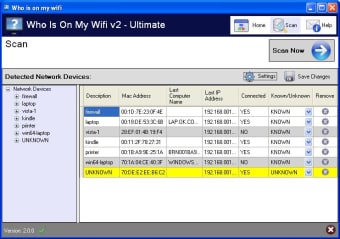
Finding out who is on your Wi-Fi is an easy process. All you have to do is click scan now and Who Is On My Wi-Fi will scan your network for all of the devices connected. The scan takes a few minutes, but the list of results the program gets is quite comprehensive so it’s worth the wait.

The program also possesses a lot of features that users will appreciate. One such feature is being able to schedule scans. Who Is On My Wi-Fi automatically scans your network every few minutes. You can also set the frequency of these scans. You can choose to set the program to scan every 2 to 10 minutes. This is great because it allows you to check your network frequently and without having to go through a lot of trouble.

The Negatives

Probably the biggest issue with this program is the fact that the design isn’t very good. It has a dark blue and white color scheme. While that in itself isn’t bad, what’s really painful to the eye is the bright yellow highlight that they chose to use for the devices after you scan your network. Additionally, it’s a bit annoying to have to manually change the networks from UNKNOWN to KNOWN. Finally, the fact that notifications have both a Windows pop-up and a voice notification is unnecessary and frustration. All that said, none of these things are terrible enough that it would shy users away from the program. It’s still perfectly acceptable.

Good at What It Does

Who Is On My Wifi’s purpose is to help users find out who is using their Wi-Fi and it certainly performs its duties well with speed and efficiency. The design of the software could have been a little better. However, it is ultimately not terrible enough to be a deal breaker. The useful features that the program possesses more than makes up for the unfortunate design choices. If you want to keep an eye on who’s using your Wi-Fi network, go ahead and use this program. It definitely won’t let you down.


  • Pros

    • Scanning is quick
    • Installation was fast and uncomplicated
    • Can set a schedule for scanning the network
    • Has extensive event log
  • Cons

    • Difficult to use
    • Ugly color scheme
    • Unintuitive interface
    • No help files
 0/1

App specs

Program available in other languages


User reviews about Who Is On My Wifi

3.6

5 reviews

Add review

Main reviews for you

  • Anonymous user

    Gostei muito do programa por ser muito simples eficaz e facil de usar.Encontrei o programa pesquisando na Google.

  • Anonymous user

    This application is not allowing me to block devices which are not permitted to use the network

  • Anonymous user

    Easy to install and simple interface to see your network's devices.. I was looking for an easily installing, small program to monitor my wifi network. I tried one that was recommended, but got no results. With WIOMW, the installation wizard got me up and running in four steps. The initial scan came back with unknown for all of the devices, but many had descriptions which made identification easy. The other unknowns had expansions of the description to the far right of the screen which made identification easy because the manufacturer was shown. Then I could toggle all of the unknowns to knowns and save the changes (upper right hand corner).Once that was done, every 5 minutes the program would scan my network for the devices being connected or not and any new devices.Couldn't be simpler... even for a novice... as long as you can read the screen. Pros: Ease of use.Help in identifying devices. Cons: Nothing yet.



  • Anonymous user

    I never got the program. I don't want a downloader--I want a program--Who is on my wifi!----how do I get that?---not a downloader with malware? Pros: nothing Cons: a straight download

  • Anonymous user

    It will resolve so many questions about my wi-fi . Easy D-load,so let the game begin. At night my PC gets really slow and found out someone its using my paid wifi,... time to see who ! nobody rides for free Pros: Easy operation Cons: As off now ! nothing just let it run as is.

More

You may also like

Alternatives to Who Is On My Wifi

Explore Apps

Latest articles

Laws concerning the use of this software vary from country to country. We do not encourage or condone the use of this program if it is in violation of these laws.
Softonic

Is Who Is On My Wifi safe?

Score result: Clean

This file passed a comprehensive security scan using VirusTotal technology. It is safe to download.

  • Virus free
  • Spyware free
  • Malware free
  • Verified by Security Partners

    VirusTotal logo

Scan Info

Last scan
Wednesday, December 2, 2020
Scan provider
VirusTotal

Softonic security commitment

Who Is On My Wifi has been thoroughly scanned by our advanced security systems and verified by industry-leading partners. This file comes from the official developer and has passed all our security checks, showing no signs of viruses, malware, or spyware. For more information, visit our Security and Trust Center